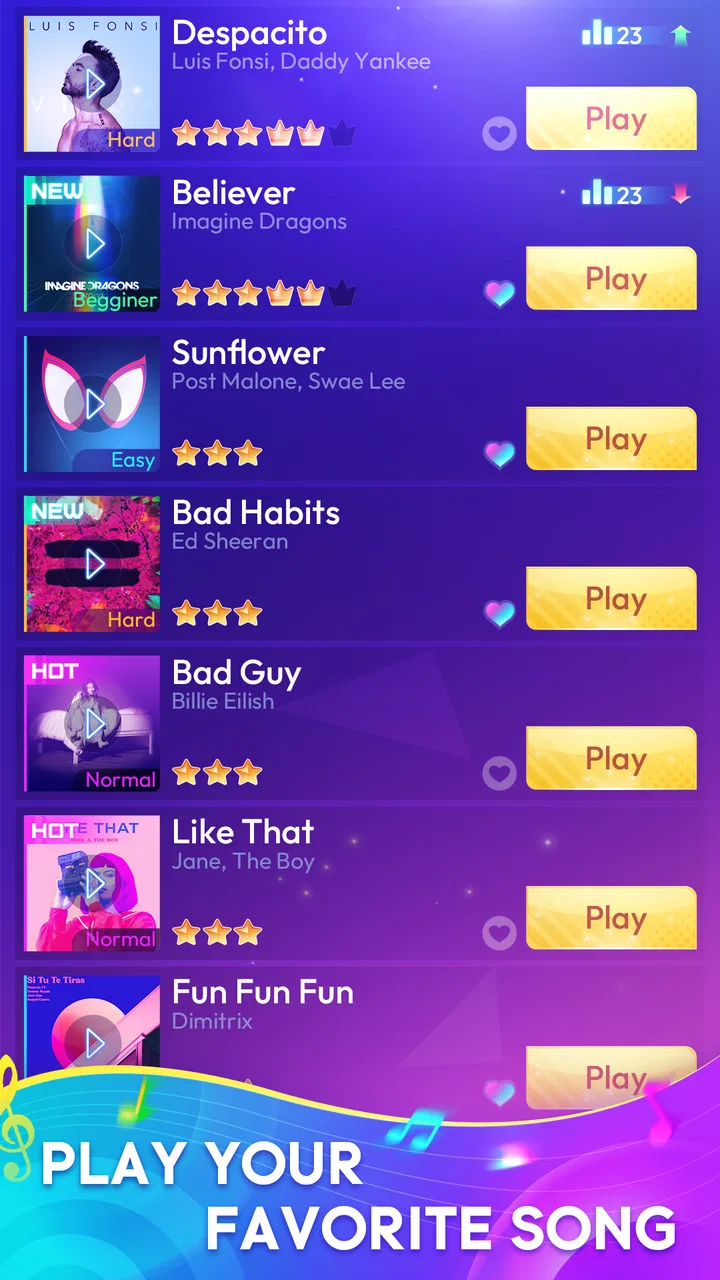
Rhythm Tiles : Piano Game
- 4.5
- Rating
- 10.00M
- Installs
- Free
- Price

 Analysis by App-foxy
I spent time with Rhythm Tiles: Piano Game as a quick-play music game, and my first impression was clear: it is built for short bursts of concentration rather than long, thoughtful sessions. The idea is simple to understand. Notes move in time with a song, and I tap the piano-style tiles as the beat arrives. When the track is working with me, the experience feels immediate and satisfying; when timing, touch response, or attention slips, the same simplicity makes mistakes feel especially noticeable.
This is a free game in the music category from Boom Studio Limited. Its focus is on Hip-Hop and EDM-inspired rhythm play, so it suits people who want a lively tap challenge more than a traditional piano-learning tool. It is also marked for Everyone, which makes it approachable for younger players and casual family use, although the speed and concentration required can still make some songs demanding.
What playing Rhythm Tiles feels like in everyday use
The strongest part of the game is how quickly I can start a round. There is no complicated musical theory to learn, and I do not need to know how to read sheet music. I simply watch the incoming pattern and try to keep my taps aligned with the music. That makes it a convenient choice when I have a few spare minutes, such as while waiting for an appointment or taking a short break between tasks.
You May Also Like

 AccuWeather: Weather Radar
AccuWeather Review: A Quick, Clear Forecast for Everyday Decisions
For everyday plans, the best forecast is the one you can understand quickly. AccuWeather makes rain timing, radar, and local conditions easy to act on, with a few trade-offs.

 Hill Climb Racing
Why Hill Climb Racing Still Turns Crashes Into One More Run
A tiny car, a bumpy hill and one more upgrade: Hill Climb Racing keeps resurfacing because its simple chaos makes every near-miss feel personal.

 AliExpress - Shopping App
AliExpress Makes Global Shopping Feel Personal, but Shoppers Bear the Risk
AliExpress turns a global marketplace into a pocket-sized discovery engine. Its reach is useful, its shopping loop compelling, and its trade-offs easy to miss.

 Lords Mobile: Kingdom Wars
Lords Mobile Is a Kingdom-Building Routine, Not a Quick Match
A case-by-case verdict on the building, battles, device demands, and social commitments that make Lords Mobile rewarding for some players and exhausting for others.

 PDF Scanner app - TapScanner
TapScanner Makes Paperwork Easier to Capture, Check, and Share
TapScanner makes scanning with a phone feel less like a rescue operation and more like a dependable step in getting work done. Its capture tools are useful, though not flawless.

 Block Blast!
 Shows How Much a Puzzle Game Can Leave Out
A quiet grid game shows why puzzle players increasingly value instant clarity, repeatable skill and low-pressure play—and where the genre still needs to catch up.
More From Our News Desk
View All News


The piano presentation gives each song a familiar visual shape, but this is not the same as practicing an instrument. My hands are reacting to a stream of targets, not learning finger placement, chords, or melody in a transferable way. That distinction matters. If your goal is relaxation through music and quick reflex play, the format makes sense. If you want to improve at piano, an instructional app with lessons and feedback would be a better match.
I also found that the game asks for more visual attention than its basic controls suggest. At the beginning of a session, the taps can feel calm and predictable. As the pattern becomes denser, I have to stop looking at the decorative presentation and focus on the tile path. Playing with one hand is possible for simple moments, but using both hands can feel more natural when the sequence spreads across the screen.
The game has attracted a sizeable audience, with an average rating of 4.5 from around 11 thousand ratings and more than 10 million installs. Those figures suggest that the quick rhythm format has broad appeal, but they should not be read as a guarantee that every player will enjoy it. People who dislike repetition, rapid tapping, or music games that punish missed timing may lose interest quickly.
Where new players usually get stuck
The first common sticking point is not understanding what the game wants from a tap. A tile can look like something to press immediately, but the useful habit is to watch its movement and make contact as it reaches the active area. Tapping too early creates a rhythm problem even when my eyes are on the right lane. I had better results when I treated the visual motion as a countdown instead of tapping as soon as a tile appeared.
Another difficulty comes from playing on a small screen while holding the phone. My thumb can cover part of the pattern, especially when I try to play one-handed in portrait orientation. For a serious attempt, I prefer placing the phone on a stable surface and keeping both hands available. This is a small change, but it reduces accidental touches and makes the next tile easier to see.
Some players may also mistake a missed note for a technical failure. That is understandable because a fast song leaves little time to judge what happened. Before blaming the game, I check whether I tapped the correct lane, whether my finger landed near the edge of the tile, and whether I was watching the next note rather than the one I had just hit. Rhythm games turn tiny changes in attention into visible mistakes.
Song difficulty can create a similar illusion. A track that feels comfortable during the opening moments may become much harder once the pattern accelerates. I do not interpret that change as inconsistent behavior by itself. It is part of the challenge, and it means I should warm up with a slower or more familiar selection before trying to improve a result.
Sound can be another source of confusion. If I play with the volume low or in a noisy place, I rely almost entirely on the screen. That is possible, but the musical cue is useful for anticipating the next tap. In a quiet room, headphones or the phone speaker at a comfortable level can make the timing easier to follow. I would not raise the volume excessively just to chase better accuracy; clear, comfortable audio is enough.
Simple setup checks before blaming the game
Before a focused session, I make sure the phone is running a compatible system. The game supports Android 6.0 and newer, so older devices should be checked before installation. Compatibility alone does not tell me how comfortably the game will run, but it is the first practical checkpoint when someone cannot install or open it.
I also close demanding apps before playing if the phone feels busy. This is not a special requirement of the game; it is a sensible way to reduce distractions and leave the device in a more stable state. If the screen is already responding slowly elsewhere, a rhythm game is a poor place to test it because even a brief delay can affect a tap.
Touchscreen cleanliness matters more here than in many slower games. A fingerprint, moisture, or a thick screen protector can make a light tap feel unreliable. I wipe the display, keep my fingers dry, and avoid playing immediately after handling food or drinks. These checks sound ordinary, but they are more useful than repeatedly restarting after every missed tile.
Orientation and grip deserve attention too. I try not to squeeze the phone from the sides, since that can make my hand cover a lane or create accidental contact. A stable grip gives the tapping finger room to move. If the device is large, setting it down can be more comfortable than forcing a one-handed style that hides part of the play area.
Because the game is free, it is easy to install casually and begin without thinking about spending. I would still review the purchase controls before handing the phone to a child. Optional in-app items range from $0.49 to $75.88 per item, so the free entry point should not be confused with an entirely purchase-free experience. The Everyone age label describes the content suitability, not a promise that every device or account setting is automatically protected from accidental transactions.
The current version is 1.5.13, and keeping the installation current is a reasonable first step if the game behaves differently from what I expect. I do not assume every issue is fixed by an update, but using an older build can make troubleshooting needlessly complicated. I also check that the phone has enough free storage for normal operation and that the connection is stable when the game needs to load anything beyond the immediate screen.
Recovering a session without making the problem worse
When a round feels unresponsive, my first recovery step is deliberately simple: I leave the active session, wait briefly, and open it again. Repeatedly tapping the screen while the game is slow can create extra inputs and make it harder to tell whether the issue was timing or responsiveness. A clean restart gives me a better test.
If the game opens but the taps still feel wrong, I compare it with another part of the phone. I scroll through a webpage or type a short message to see whether the touchscreen reacts normally. If those actions are also delayed, the problem is probably broader than this game. If everything else responds well, I return to a short, low-pressure round rather than immediately attempting a difficult song.
I find it useful to separate three kinds of failure: installation trouble, playback trouble, and performance trouble. Installation trouble points me toward system compatibility or storage. Playback trouble makes me check sound, connection, and whether the selected song is loading correctly. Performance trouble leads me to close background apps, cool the phone, and test again with a simpler setup. This approach prevents me from changing several things at once and forgetting what helped.
If the game closes unexpectedly, I restart the phone before taking more drastic action. A restart clears temporary system problems without immediately removing local app information. I would only consider reinstalling after making sure I am comfortable with the possibility that local progress or preferences may not return. That is a general recovery precaution, not a reason to remove the game as a first response.
For a child using the game, recovery also includes checking who is holding the device and what was pressed. A child may report that the game is broken after an accidental screen change, a muted device, or a difficult song. I ask them to show me the exact moment the problem happens, then reproduce it with a calm, easy attempt. That usually gives a clearer answer than relying on a frustrated description.
One practical habit is to stop after several poor rounds instead of chasing the mistake indefinitely. Fatigue changes timing, grip, and attention. I often improve more by taking a short break than by continuing to tap harder. This is especially important in a game where the difference between a good attempt and a bad one can be a fraction of a second.
When the app is not the cause
A rhythm game can expose weaknesses in the phone that are invisible during slower tasks. If the device is overheating, the display may feel less consistent, or background activity may compete for resources. I do not treat every missed note as evidence of a software fault. I first test whether the phone is comfortable, responsive, and free from obvious interruptions.
Notifications are another overlooked problem. A banner, vibration, incoming call, or floating control can pull my eyes away at exactly the wrong moment. For a focused session, I use a quiet environment and reduce interruptions through the phone’s normal settings. This is particularly useful when I am trying to judge whether my timing has improved.
Audio delay can also be outside the game itself. Different speakers, headphones, and wireless connections can introduce different timing impressions. If the visual movement seems correct but the music feels late, I test the phone’s built-in speaker or another listening setup before deciding that the game is misaligned. I avoid making a permanent judgment based on one accessory.
Network conditions may matter during loading or other connected moments, but a poor connection does not automatically explain every tap issue. If a song loads normally and the screen responds well, I focus on my timing and grip. If loading repeatedly stalls, I check the connection, move to a more reliable network, and try again later rather than repeatedly pressing controls.
Finally, personal expectations can create friction. Someone coming from a traditional piano game may expect the tiles to follow a melody in a way that teaches musical structure. Someone coming from an arcade game may expect forgiving controls and unlimited experimentation. This title sits closer to a fast visual rhythm challenge, so it works best when I judge it by responsiveness, song-driven concentration, and replay value rather than by educational depth.
Who will enjoy it, and who should choose something else
I would recommend this game to people who want a compact music challenge that can be understood almost immediately. It is a good fit for players who enjoy Hip-Hop and EDM energy, like improving their timing, and do not mind replaying a song to get a cleaner run. The free starting point also makes it easy to try without committing to a paid download.
It is less suitable for someone seeking a calm listening app. Although the music can make a session enjoyable, my attention stays on the tiles, so I am not passively enjoying the songs. It is also not the right choice for learning piano technique. The game may sharpen visual reaction and hand coordination, but it does not replace guided practice on an instrument.
Compared with a conventional piano-learning app, this one is lighter, faster, and more immediately playful, but it offers less structured instruction. Compared with a broad rhythm game, its piano-tile presentation makes the action easier to grasp, though players who want deep customization, elaborate progression, or a wide range of musical genres may prefer a more complex alternative. The best choice depends on whether quick accessibility or long-term depth matters more to you.
For families, the Everyone rating is reassuring from a content perspective, and the controls are simple enough for a child to understand. I would still supervise younger players during the first session, not because the game is difficult to explain, but because fast tapping can become frustrating and the available in-app purchase range deserves sensible device-level controls.
My practical verdict after using it
Rhythm Tiles: Piano Game succeeds when I treat it as a focused arcade-style music game rather than a piano simulator. Its best quality is the short path from opening the app to making music-driven taps. The format is approachable, the challenge can become surprisingly demanding, and the Hip-Hop and EDM direction gives the sessions more energy than a purely mechanical tapping exercise.
Its limitations are equally important. A small screen, tired hands, noisy surroundings, delayed audio, or an overloaded phone can make the experience feel worse than it really is. The game also has a narrow purpose: quick rhythm practice and replayable tapping, not musical education or relaxed song playback. Players who understand that trade-off are more likely to enjoy it.
Boom Studio Limited has made a free title with a broad audience, and the current version gives Android users on version 6.0 or later a straightforward way to try the format. I would begin with a clean screen, a stable grip, comfortable audio, and a short session. If the controls feel responsive and the music keeps me engaged, it is easy to see why this game has become a popular download.
My recommendation is conditional but positive: try it if you want an accessible rhythm challenge for spare moments, especially if you already enjoy energetic music and replay-based games. Skip it if you need lessons, deep musical control, or a completely interruption-free experience. For the right player, the simple design is the appeal; for everyone else, that same simplicity may feel limiting after the novelty fades.
FAQs for Rhythm Tiles : Piano Game
01What is Rhythm Tiles: Piano Game?
Rhythm Tiles: Piano Game is a music-based tapping game in which you press piano-style tiles in time with songs and melodies. The main objective is to follow the rhythm accurately while avoiding missed or incorrectly tapped tiles. As you progress, the patterns generally become faster and more challenging, making the game suitable for short sessions as well as players who enjoy improving their timing and reflexes.
02Can I play Rhythm Tiles: Piano Game offline?
Many parts of Rhythm Tiles: Piano Game may be playable without a constant internet connection, especially basic gameplay modes that have already been installed. However, an internet connection may still be required for downloading songs, displaying advertisements, synchronizing progress, accessing online features, or receiving updates. It is best to open the game online at least once and check which content remains available when your device is offline.
03Is Rhythm Tiles: Piano Game free to download and play?
The game can generally be downloaded at no initial cost, allowing users to try its core piano-tile gameplay before deciding whether to continue. Like many free mobile games, it may include advertising, optional in-app purchases, unlockable content, or paid features. Before downloading, review the store listing and purchase settings carefully, particularly if children will be using the device.
04Does Rhythm Tiles: Piano Game include many songs or difficulty levels?
The available music and difficulty options can vary depending on the version of the game, device, region, and updates released by the developer. Players should expect progressively faster tile patterns and songs designed to test timing, concentration, and reaction speed. Some content may be unlocked through gameplay, while other tracks or features could require watching advertisements, completing challenges, or making optional purchases.
05Is Rhythm Tiles: Piano Game suitable for children and beginners?
Rhythm Tiles: Piano Game is easy to understand because its basic control usually involves tapping tiles at the correct moment, so beginners can start playing quickly. Nevertheless, later stages may become quite fast and demanding. Parents should check the game’s age rating, advertising policy, privacy information, and in-app purchase settings before allowing children to play, since these details can differ between Android and iOS versions.
Pros
- Simple one-touch controls are easy for beginners to learn.
- Short songs make it convenient for quick gaming sessions.
- Increasing speed provides a satisfying challenge for reflexes.
- Bright visual effects make successful taps feel rewarding.
- Playable offline
- so it works well during travel or without Wi-Fi.
Cons
- Some tracks and features may require in-app purchases to unlock.
- Fast sections can feel difficult on smaller phone screens.
- Repeated songs may make the experience feel less varied over time.
- Visual effects can be distracting or uncomfortable for some players.
- Progress may feel limited if you prefer deeper rhythm-game mechanics.

Rhythm Tiles : Piano Game
Gallery